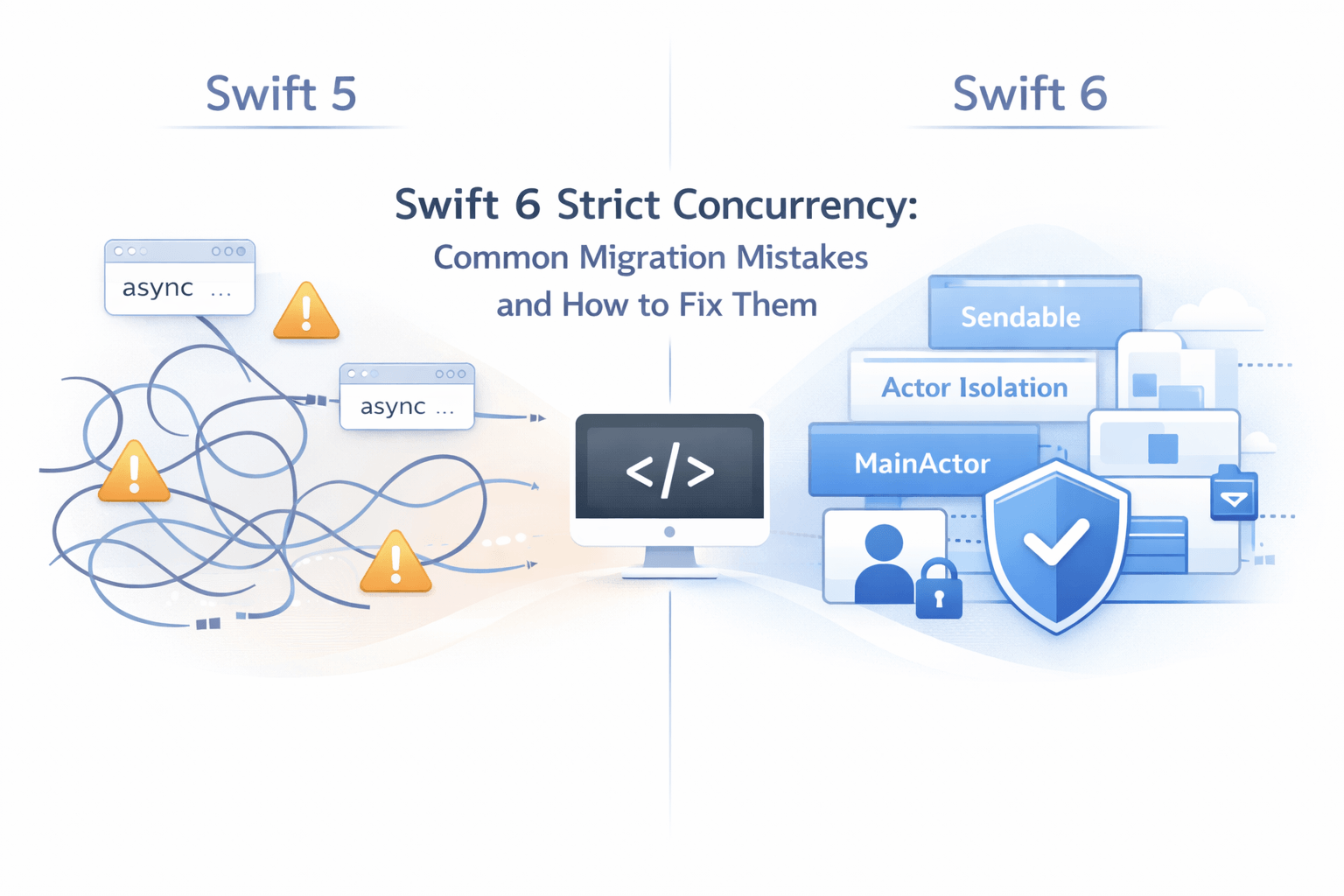
If you’ve recently enabled Swift 6 mode and your build suddenly turned into a wall of red errors — you’re not alone. Swift 6’s strict concurrency checking is one of the most impactful changes to the language in years. It makes your apps safer and your async code more predictable. But getting there can feel rough if you don’t know what you’re looking at.
This guide breaks down the four most common migration mistakes, why they happen, and exactly how to fix them. Let’s get your build green again.
Why Swift 6 Strict Concurrency Feels Painful at First
Swift 5 introduced async/await and actors, but concurrency checking was mostly opt-in. The compiler gave you warnings and still let you ship. Swift 6 changes that contract completely — strict concurrency is now enforced at compile time [Ref-1]. What used to be a yellow warning is now a hard build error.
That’s actually a good thing. This shift surfaces bugs that were silently lurking in your codebase: data races, unsafe cross-thread mutations, unchecked shared state. It doesn’t mean your code was broken before. It means you finally have proof that it isn’t.
💬 When I first enabled Swift 6 mode on a project I’d been maintaining for two years, I had 60+ errors. My immediate reaction was frustration. Looking back, at least a dozen of those were real bugs waiting to happen.
Here’s what makes migration manageable: most errors fall into a small set of repeating patterns. Once you recognise them, the fixes become instinctive. If you’re still getting comfortable with async/await fundamentals, our guide on mastering Swift async/await is worth reading before continuing. Let’s walk through the four most common migration mistakes.
Mistake #1 — Not Understanding Sendable and Why It Matters
What Is Sendable?
Sendable is a protocol that marks a type as safe to pass across concurrency boundaries – between actors, tasks, or threads [Ref-2]. When a type conforms to Sendable, the compiler can guarantee it won’t cause a data race when shared.
Value types – structs and enums – with Sendable properties conform automatically. Reference types need explicit conformance, and the compiler will push back if you try to cross a boundary without it.
// ✅ Automatically Sendable — value type with Sendable properties
struct UserProfile: Sendable {
    let id: UUID
    let name: String
    let avatarURL: URL
}
For simple value types, the compiler infers Sendable without any extra work from you. The moment you introduce a reference type, a closure, or a mutable stored property, it will ask you to be explicit about what you’re doing.
The Common Mistake
The most frequent mistake is passing a non-Sendable type – a custom class, a delegate, or even a UIImage – into an async closure or Task without considering thread safety.
Here’s a scenario that comes up all the time. You have a ProfileViewModel class and you pass it into a background Task to kick off a network call:
// ❌ Broken — ProfileViewModel is not Sendable
class ProfileViewModel {
    var username: String = ""
    var followerCount: Int = 0
}

let viewModel = ProfileViewModel()

Task {
    // ⚠️ Swift 6 error: capture of 'viewModel' with non-sendable type
    // 'ProfileViewModel' in a @Sendable closure
    await fetchProfile(for: viewModel)
}
Swift 6 flags this immediately. ProfileViewModel is a reference type with mutable state — two contexts could access and mutate it at the same time. That’s a textbook data race.
How to Fix It
There are three practical paths forward, and the right one depends on your architecture:
- Convert to a value type. If
ProfileViewModeldoesn’t need reference semantics, make it a struct.Sendableconformance comes for free [Ref-3]. - Move it to an actor. If the type manages mutable state, an actor is the right fit. Actor isolation enforces serial access automatically [Ref-4].
- Use
@unchecked Sendableas a last resort. Only reach for this if you’re managing thread safety manually — with a lock or a serial queue — and you can clearly document why it’s safe [Ref-2].
// ✅ Option 1 — Value type, Sendable by default
struct ProfileViewModel: Sendable {
    let username: String
    let followerCount: Int
}

// ✅ Option 2 — Actor for mutable shared state
actor ProfileViewModel {
    var username: String = ""
    var followerCount: Int = 0

    func update(username: String) {
        self.username = username
    }
}

// ⚠️ Option 3 — Only when you control thread safety yourself
final class ProfileViewModel: @unchecked Sendable {
    private let lock = NSLock()
    private var _username: String = ""

    var username: String {
        lock.withLock { _username }
    }
}
Start with Option 1 wherever you can. It’s the cleanest, and the compiler does the heavy lifting. This also lines up with the Single Responsibility Principle – a value type that only holds data has no business managing thread coordination.
Mistake #2 — Ignoring Actor Isolation Errors
What Is Actor Isolation?
Actors protect mutable state by serialising access – only one task runs inside an actor at a time [Ref-4]. @MainActor is a special global actor that pins code to the main thread, which is exactly where UIKit and SwiftUI expect UI updates to happen [Ref-5].
Actor isolation means you can’t freely read or write actor-protected state from outside that actor. The moment you cross the boundary without await, Swift 6 will stop you.
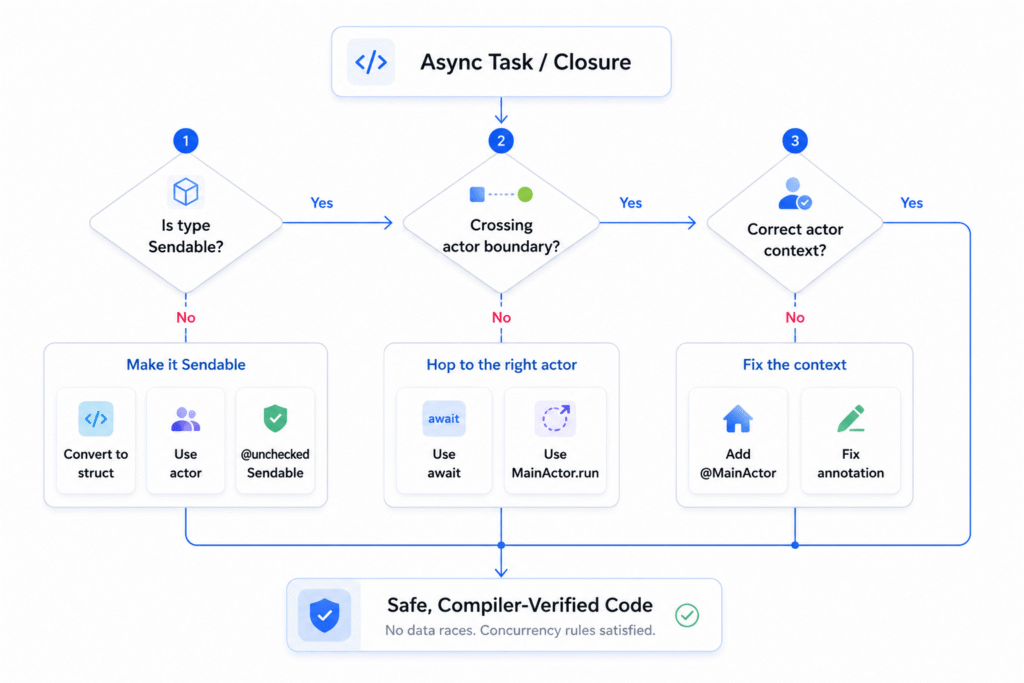
Direct cross-boundary access is blocked. An awaited hop to @MainActor is always the right path.
The Common Mistake
This one shows up constantly in apps that mix URLSession calls with UI updates. You fire off a background task, get your data back, and then try to update a @MainActor property directly:
// ❌ Broken — accessing @MainActor property from non-isolated async context
class FeedViewController: UIViewController {
    @MainActor var posts: [Post] = []

    func loadFeed() {
        Task {
            let fetched = await FeedService.shared.fetchPosts()
            // ⚠️ Swift 6 error: main actor-isolated property 'posts'
            // cannot be mutated from a non-isolated context
            posts = fetched
        }
    }
}
The Task { } closure runs in an unstructured async context. It doesn’t automatically inherit @MainActor, so accessing posts directly is an isolation violation [Ref-6].
How to Fix It
The fix comes down to being explicit about where the context switch happens. Here are two clean options:
// ✅ Option 1 — await the hop back to @MainActor
func loadFeed() {
    Task {
        let fetched = await FeedService.shared.fetchPosts()
        await MainActor.run {
            posts = fetched
        }
    }
}

// ✅ Option 2 — annotate the whole function with @MainActor
@MainActor
func loadFeed() {
    Task {
        let fetched = await FeedService.shared.fetchPosts()
        posts = fetched // ✅ Already on @MainActor
    }
}
Option 2 is usually the cleanest for view controllers and view models that are inherently UI-bound. If a class exclusively manages UI state, mark the whole class @MainActor and eliminate the noise entirely. KISS applies here – the simpler your isolation model, the harder it is to get wrong.
If you’re building SwiftUI-heavy apps, it’s also worth understanding the SwiftUI performance implications of strict concurrency – actor-bound view models interact directly with how SwiftUI schedules redraws.
Mistake #3 — Overusing nonisolated and @unchecked Sendable
When errors start piling up, nonisolated and @unchecked Sendable can look very attractive. One keyword and the error disappears. The problem is, the compiler stops checking – but the underlying risk doesn’t go away. You’re telling Swift “trust me,” and Swift does, unconditionally [Ref-7].
💬 I’ve reviewed codebases where
@unchecked Sendablewas sprinkled across every model class to “get it compiling.” Every single one was a ticking time bomb.
That said, both keywords have legitimate roles. nonisolated is perfectly valid for methods or computed properties on an actor that don’t touch mutable state – like a pure formatting helper:
actor UserActor {
    var firstName: String = ""
    var lastName: String = ""

    // ✅ Legitimate — doesn't touch mutable state, no isolation needed
    nonisolated func formattedName(first: String, last: String) -> String {
        "\(first) \(last)"
    }
}
@unchecked Sendable makes sense when you’re wrapping a thread-safe type that predates Swift concurrency – a lock-protected image cache, for example [Ref-2]:
// ✅ Legitimate — thread safety is manually guaranteed
final class ImageCache: @unchecked Sendable {
    private let lock = NSLock()
    private var cache: [String: UIImage] = [:]

    func image(for key: String) -> UIImage? {
        lock.withLock { cache[key] }
    }
}
Here’s what to watch for in code review: nonisolated on a method that actually reads or writes actor state, @unchecked Sendable on a class with public mutable properties and no locking mechanism, or an entire module’s model layer stamped with @unchecked Sendable just to stop the build from failing.
If you can’t immediately explain why something is safe, that’s your cue to step back and rethink the data flow. Suppress carefully or not at all.
Mistake #4 — Misunderstanding async Context Inheritance
This is the most subtle mistake in the list, and it’s easy to miss because it worked fine in Swift 5. Developers assume an async function called from a @MainActor context will automatically run on the main actor. It won’t – unless it’s explicitly annotated [Ref-6].
Here’s how it usually surfaces. You have a @MainActor-annotated view model, it calls an async helper to load some data, and that helper tries to update a @Published property:
// ❌ Broken — async function doesn't inherit @MainActor context
@MainActor
class DashboardViewModel: ObservableObject {
    @Published var title: String = ""

    func refresh() {
        Task {
            await loadTitle() // Hops off @MainActor here
        }
    }

    // Not @MainActor — runs on a generic executor
    func loadTitle() async {
        let result = await TitleService.fetch()
        // ⚠️ Swift 6 error: main actor-isolated property 'title'
        // cannot be mutated from a non-isolated context
        title = result
    }
}
The async keyword doesn’t forward actor context. Task { } starts fresh every time. Task.detached { } is even more intentional about it – it explicitly drops all actor context [Ref-8].
The fix is straightforward: declare where the function belongs, rather than relying on the caller to figure it out.
// ✅ Option 1 — annotate the async function directly
@MainActor
func loadTitle() async {
    let result = await TitleService.fetch()
    title = result // ✅ Isolated, safe
}

// ✅ Option 2 — hop back explicitly with MainActor.run
func loadTitle() async {
    let result = await TitleService.fetch()
    await MainActor.run {
        title = result
    }
}
A good rule of thumb: if a function writes to @Published properties or drives any UI update, it belongs on @MainActor. Annotate it at the definition. This is the DRY principle applied to actor context – define the contract once at the function level, not scattered across every call site.
This is especially important when working with @Published properties – if you want a deeper understanding of how property wrappers work under the hood in Swift, that context helps clarify why actor isolation and @Published interact the way they do.
Bonus — A Practical Swift 6 Strict Concurrency Migration Strategy
Turning on Swift 6 mode for an entire mature codebase in one go is rarely the right call. The error count can feel demoralising, and rushing through fixes without understanding each one is how new bugs sneak in.
💬 The first time I tried enabling Swift 6 all at once on a mature app, I had 200+ errors before my morning coffee. Incremental migration wasn’t a strategy – it was survival.
Here’s an approach that actually works [Ref-9]:
- Start with
SWIFT_STRICT_CONCURRENCY = targetedin your build settings. This surfaces the most critical issues without enabling full strict mode – a great first pass to understand your baseline. - New modules first. Any new feature targets you create should be written in full Swift 6 mode from day one. Clean slate, no debt.
- Work through error categories in order. Fix
Sendableconformance issues first, then tackle actor isolation errors, then clean up anynonisolatedor@unchecked Sendablesuppressions you added as temporary fixes. - Switch from
printtoLoggeras you touch files [Ref-10]. It’s a small habit change, but it signals intent – you’re modernising, not just patching.
// ✅ Use Logger instead of print during migration debugging
import OSLog

private let logger = Logger(subsystem: "com.yourapp.feed", category: "Migration")

logger.debug("Actor isolation resolved for FeedViewModel")
As you work through migration errors, pairing Logger with the right debugging tools in Xcode makes it significantly easier to track down exactly where an actor isolation violation is happening at runtime.
Take it one target at a time. You’ll learn more from 20 well-understood fixes than 200 suppressions.
Conclusion
Swift 6 concurrency errors aren’t the compiler being difficult. They’re the compiler showing you real bugs – races and isolation violations that existed before, just silently. Every error you resolve is a crash or a corrupted state you’ll never have to chase down in production.
The four mistakes in this guide cover the vast majority of what you’ll hit during migration. Learn to recognise them, and the rest becomes a pattern-matching exercise.
💬 Once you get through migration, the confidence you gain in your async code is worth every error. You stop wondering “is this thread-safe?” – because the compiler already checked.
Take it one module at a time. The codebase on the other side is meaningfully better – and so is the developer who built it.
If this guide has you thinking more carefully about how you design shared state in your app, the next article in this series goes deeper into designing safe shared state with actors – including when actors are the right call and when they’re overkill.
References
[Ref-1] Swift.org – Swift 6 Language Mode – Migration Guide
[Ref-2] Swift Evolution – SE-0302: Sendable and @Sendable Closures
[Ref-3] Apple Developer Documentation – Choosing Between Structures and Classes
[Ref-4] Swift Evolution – SE-0306: Actors
[Ref-5] Apple Developer Documentation – MainActor
[Ref-6] Apple Developer Documentation – Concurrency – Swift Language Reference
[Ref-7] Swift Evolution – SE-0337: Incremental Migration to Concurrency Checking
[Ref-8] Apple Developer Documentation – Task.detached(priority:operation:)
[Ref-9] Swift.org – Enabling The Swift 6 Language Mode
[Ref-10] Apple Developer Documentation – Logger – OSLog
