
Introduction
Performance optimization is the key to delivering outstanding iOS experiences. Users expect lightning-fast apps without hiccups or delays. In this guide, you will discover actionable performance optimization strategies to help your apps stand out. Let’s dive in and make your apps the fastest on the market.
Why Performance Optimization Matters
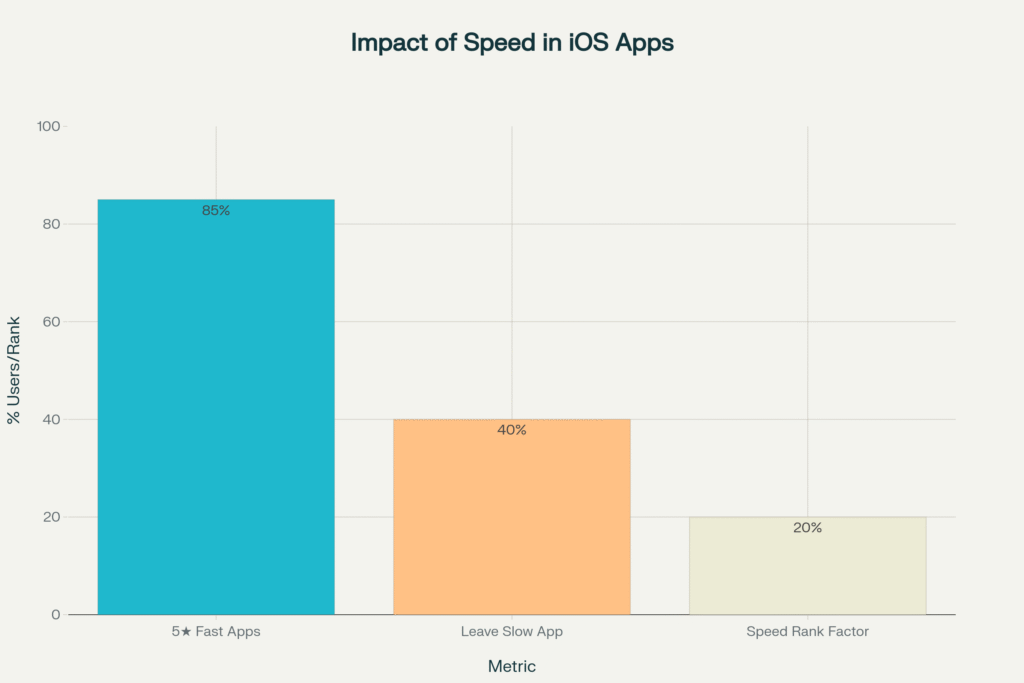
When you focus on performance optimization, everyone benefits:
- Users are happier because apps respond instantly.
- Reviews and App Store rankings improve as a result.
- Your work stands out from other developers.
Strong speed and reliability set your product apart. Therefore, it’s essential to make performance optimization a top priority.
Performance Optimization Strategies for iOS Apps
Start with Swift 6 and Async/Await
Performance optimization starts with modern Swift. Swift 6 brings faster execution through improved concurrency.
- Use
async letfor data fetching, which speeds up critical processes. - Run tasks off the main thread to avoid freezing your interface.
- Always support task cancellation. This keeps the app responsive.
func loadProfile() async throws -> UserProfile {
    async let details = fetchUserDetails()
    async let preferences = fetchUserPreferences()
    let (profile, prefs) = try await (details, preferences)
    return UserProfile(details: profile, preferences: prefs)
}
Switching to Swift 6 is a powerful way to apply performance optimization from the ground up.
For more code, see our code examples.
Performance Optimization in SwiftUI
Many now choose SwiftUI for iOS interfaces because it’s expressive and efficient. Yet, performance pitfalls can occur.
- Break large views into small, reusable components.
- Use
.onAppearfor lazy loading. - Profile with Xcode Previews and Instruments regularly.
Furthermore, avoid excessive layers in the view hierarchy. This reduces render time and memory use.
Performance Optimization at App Launch
First impressions are critical. If the app launches slowly, users leave.
- Load essential features first—defer everything else.
- Use compressed image assets and vectors to keep startup smooth.
- Measure both cold and warm launches by using Instruments.
With every update, revisit your launch process for fresh opportunities. As a result, users experience minimal wait times.
Through Memory Management
Memory leaks slow down even the best apps. Here’s how performance optimization in memory works:
- Prefer structs (value types) to reduce memory overhead.
- Use
weakandunownedreferences to avoid retain cycles. - Monitor your app’s memory graph with Xcode tools for potential leaks.
As memory is optimized, devices run cooler, and crashes decrease. This strengthens your app’s reliability.
Using Advanced Profiling Tools
Advanced profiling is at the heart of performance optimization. Instruments in Xcode help spot bottlenecks before your users do.
- Use Time Profiler to identify slow methods, then optimize.
- Leaks and Allocations tools reveal hidden memory issues.
- Profile network use to ensure efficient background updates.
Additionally, frequent testing with these tools shortens troubleshooting time. You get faster releases, and users get better apps.
For detailed official guidance on iOS app performance, see Apple’s developer documentation on energy and performance optimization.
Quick Performance Optimization Tips
Consider these simple steps for rapid gains:
- Adopt App Clips for instant actions and lighter downloads.
- Prioritize efficient accessibility to boost both usability and speed.
- Monitor performance analytics to quickly find and fix lag spots.
For example, removing unnecessary libraries or images can trim launch times measurably. When in doubt, review your analytics dashboard for the next optimization target.
Better app performance starts with a single change. Now is the time to optimize—users and app stores demand nothing less.
What tip helped you most today? Comment below or join our newsletter for exclusive code labs and the latest iOS optimization secrets.
Let’s create the fastest, most reliable iOS apps—together.
